会话技术:
会话技术——Cookies和Session详解
视频讲解
会话:一次会话中包含多次请求和响应
- 一次会话:浏览器第一次给服务器资源发送请求,会话建立,直到有一方断开为止
功能:在一次会话的范围内的多次请求间,共享数据
方式:
- 客户端会话技术:Cookie
- 服务器端会话技术:Session
Cookie
Cookie 是什么:
- Cookie 是浏览器访问服务器后,服务器传给浏览器的一段数据。
- 浏览器需要保存这段数据,不得轻易删除。
- 此后每次浏览器访问该服务器,都必须带上这段数据。
简述 Cookie 是什么
概念:客户端会话技术,将数据保存到客户端
Cookie快速入门
使用步骤:
- 创建Cookie对象,绑定数据:
new Cookie(String name, String value)
- 发送Cookie对象:
response.addCookie(Cookie cookie)
- 获取Cookie,拿到数据:
Cookie[] request.getCookies()
例子:我们分别创建CookieDemo01和CookieDemo02,代码如下:
1
2
3
4
5
6
7
8
9
10
11
12
13
14
15
16
17
18
19
20
21
22
23
| package cookie;
import javax.servlet.ServletException;
import javax.servlet.annotation.WebServlet;
import javax.servlet.http.Cookie;
import javax.servlet.http.HttpServlet;
import javax.servlet.http.HttpServletRequest;
import javax.servlet.http.HttpServletResponse;
import java.io.IOException;
@WebServlet("/demo01")
public class CookieDemo01 extends HttpServlet {
protected void doPost(HttpServletRequest request, HttpServletResponse response) throws ServletException, IOException {
Cookie cookie = new Cookie("msg", "root");
response.addCookie(cookie);
}
protected void doGet(HttpServletRequest request, HttpServletResponse response) throws ServletException, IOException {
this.doPost(request, response);
}
}
|
1
2
3
4
5
6
7
8
9
10
11
12
13
14
15
16
17
18
19
20
21
22
23
24
25
26
27
28
29
| package cookie;
import javax.servlet.ServletException;
import javax.servlet.annotation.WebServlet;
import javax.servlet.http.Cookie;
import javax.servlet.http.HttpServlet;
import javax.servlet.http.HttpServletRequest;
import javax.servlet.http.HttpServletResponse;
import java.io.IOException;
@WebServlet("/demo02")
public class CookieDemo02 extends HttpServlet {
protected void doPost(HttpServletRequest request, HttpServletResponse response) throws ServletException, IOException {
Cookie[] cookies = request.getCookies();
if (cookies != null){
for (Cookie cookie : cookies) {
String name = cookie.getName();
String value = cookie.getValue();
System.out.println("name:"+name+",value:"+value);
}
}
}
protected void doGet(HttpServletRequest request, HttpServletResponse response) throws ServletException, IOException {
this.doPost(request, response);
}
}
|
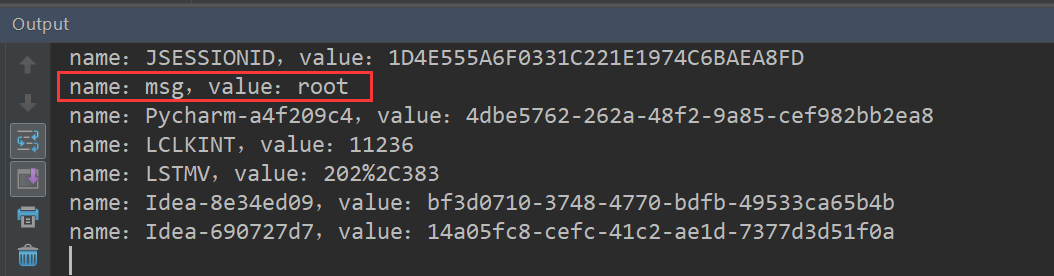
在浏览器依次访问:http://localhost:8080/cookie/demo01和http://localhost:8080/cookie/demo02
结果如下:
Cookie实现原理
cookie的工作原理是:由服务器产生内容,浏览器收到请求后保存在本地;当浏览器再次访问时,浏览器会自动带上cookie,这样服务器就能通过cookie的内容来判断这个是“谁”了。 … Cookie最早由Netscape公司开发,现在由IETF 的RFC 6265标准备对其规范,已被所有主流浏览器所支持。
Http Cookie机制及Cookie的实现原理
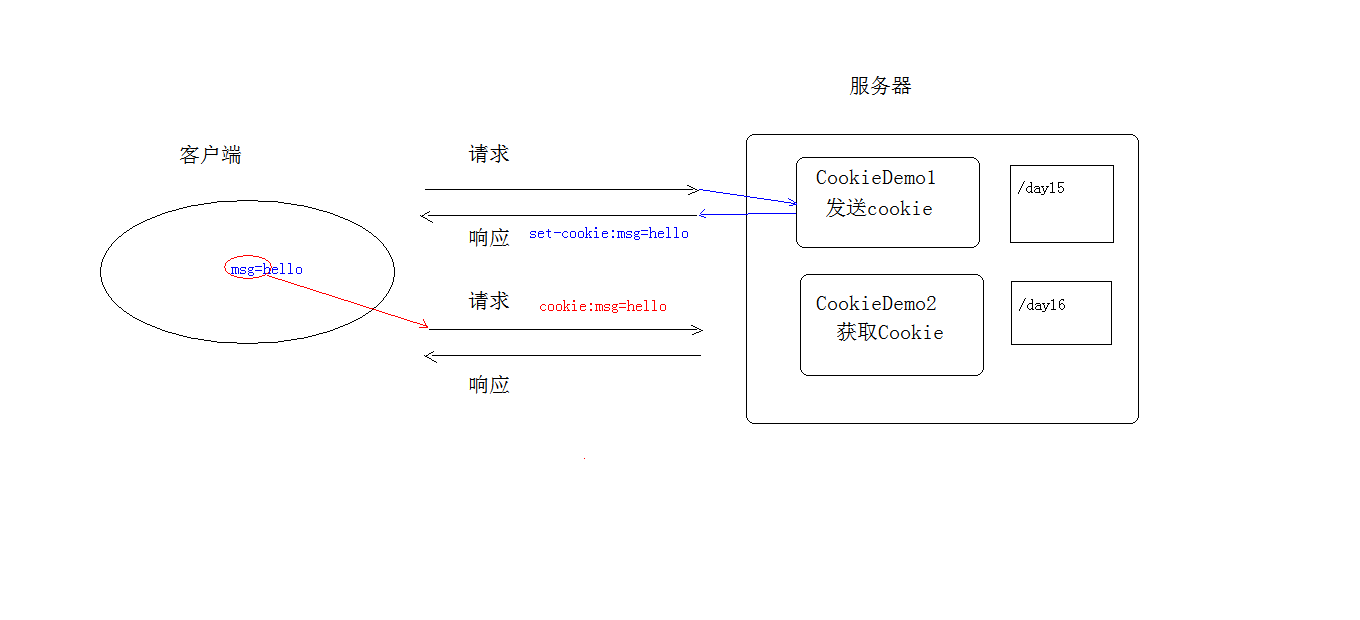
基于响应头set-cookie和请求头cookie实现
视频讲解
Cookie的细节讲解
视频讲解
- 一次可不可以发送多个cookie?
- cookie在浏览器中保存多长时间?
- cookie能不能存中文?
- cookie共享问题?
一次可不可以发送多个cookie?
可以。可以创建多个Cookie对象,使用response调用多次**addCookie方法**发送cookie即可。
cookie在浏览器中保存多长时间?
默认情况下,当浏览器关闭后,Cookie数据被销毁。
持久化存储方法:
setMaxAge(int seconds)。关于这个seconds参数(存活时间):
- 正数:将Cookie数据写到硬盘的文件中。持久化存储。并指定cookie存活时间,时间到后,cookie文件自动失效
- 负数:默认值。当浏览器关闭后,Cookie数据被销毁。
- 零:删除cookie信息
cookie能不能存中文?
在tomcat 8 之前,cookie中不能直接存储中文数据。需要将中文数据转码(一般采用URL编码(如%E3))
在tomcat 8 之后,cookie支持中文数据。(特殊字符(比如空格)还是不支持,建议使用URL编码存储,URL解码解析(下方的案例就是这样解决的))
cookie共享问题?
视频讲解
假设在一个tomcat服务器中,部署了多个web项目,那么在这些web项目中cookie能不能共享?
默认情况下cookie不能共享
关于设置cookie的获取范围的方法:
setPath(String path)
- 默认情况下,设置当前的虚拟目录
- 如果要共享,则可以将path设置为
/
不同的tomcat服务器间cookie共享问题?
相关方法:
setDomain(String path)
- 如果设置一级域名相同,那么多个服务器之间cookie可以共享。(比如说setDomain(".baidu.com"),那么tieba.baidu.com和news.baidu.com中cookie可以共享)
Cookie的特点和作用
特点:
- cookie存储数据在客户端浏览器
- 浏览器对于单个cookie 的大小有限制(一般是4kb) ,对同一个域名下的总cookie数量也有限制(一般是20个)
作用:
- cookie一般用于存出少量的不太敏感的数据
- 在不登录的情况下,完成服务器对客户端的身份识别
Cookie案例:记住上一次访问的时间
视频讲解
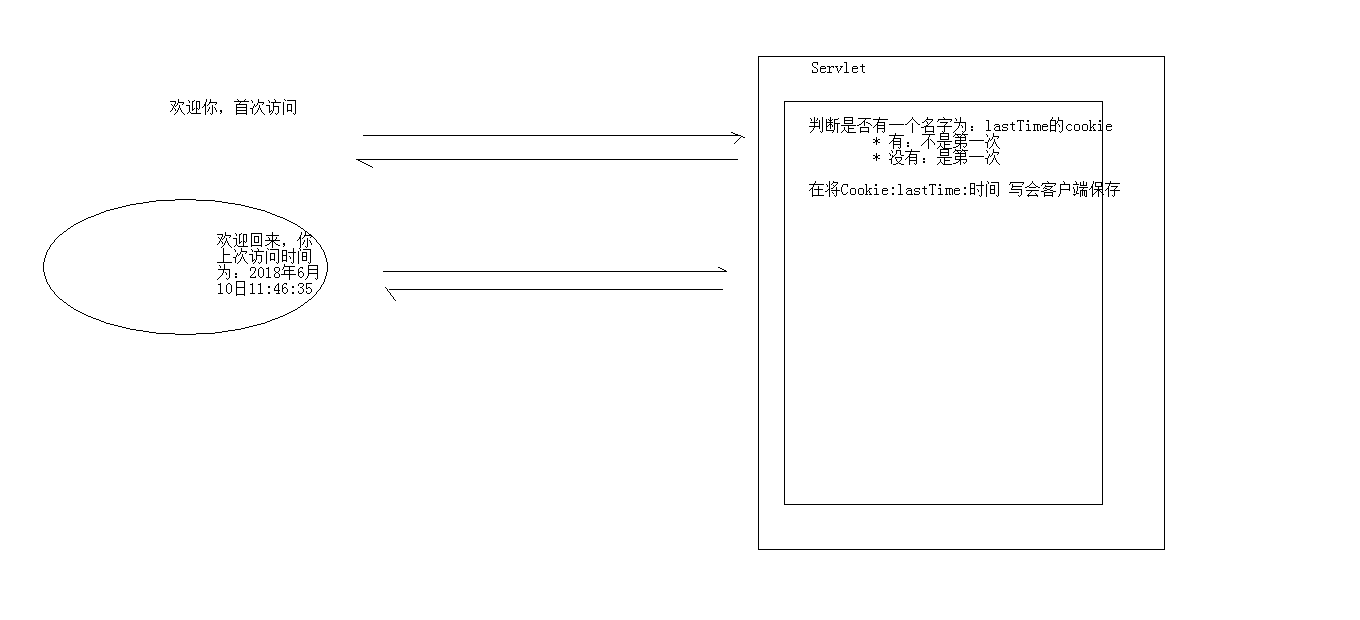
需求:
- 访问一个Servlet,如果是第一次访问,则提示:您好,欢迎您首次访问
- 如果不是第一次访问,则提示:欢迎回来,您上次访问时间为:显示时间字符串
分析:
- 可以采用Cookie来完成
- 在服务器中的Servlet判断是否有一个名为lastTime的cookie:
- 如果有:不是第一次访问
- 响应数据:欢迎回来,您上次访问时间为:2021年x月x日10:50:20
- 写回Cookie:lastTime=2021年x月x日10:50:20
- 如果没有:是第一次访问
- 响应数据:您好,欢迎您首次访问
- 写回Cookie:lastTime=2018年6月10日11:50:01
代码实现:我们创建CookieTest,代码如下:
1
2
3
4
5
6
7
8
9
10
11
12
13
14
15
16
17
18
19
20
21
22
23
24
25
26
27
28
29
30
31
32
33
34
35
36
37
38
39
40
41
42
43
44
45
46
47
48
49
50
51
52
53
54
55
56
57
58
59
60
61
62
63
64
65
66
67
68
69
70
71
72
73
74
75
| package cookie;
import javax.servlet.ServletException;
import javax.servlet.annotation.WebServlet;
import javax.servlet.http.Cookie;
import javax.servlet.http.HttpServlet;
import javax.servlet.http.HttpServletRequest;
import javax.servlet.http.HttpServletResponse;
import java.io.IOException;
import java.net.URLDecoder;
import java.net.URLEncoder;
import java.text.SimpleDateFormat;
import java.util.Date;
@WebServlet("/test")
public class CookieTest extends HttpServlet {
protected void doPost(HttpServletRequest request, HttpServletResponse response) throws ServletException, IOException {
response.setContentType("text/html;charset=utf-8");
Cookie[] cookies = request.getCookies();
boolean flag = false;
if (cookies!=null && cookies.length>0){
for (Cookie cookie : cookies) {
String name = cookie.getName();
if ("lastTime".equals(name)){
flag = true;
Date date = new Date();
SimpleDateFormat simpleDateFormat = new SimpleDateFormat("yyyy年MM月dd日 HH:mm:ss");
String simpleDateFormat_date = simpleDateFormat.format(date);
simpleDateFormat_date = URLEncoder.encode(simpleDateFormat_date,"utf-8");
cookie.setValue(simpleDateFormat_date);
cookie.setMaxAge(60*60*24*2);
response.addCookie(cookie);
String value = cookie.getValue();
value = URLDecoder.decode(value,"utf-8");
response.getWriter().write("<h1>您上次访问时间为:"+value+"</h1>");
break;
}
}
}else {
Date date = new Date();
SimpleDateFormat sdf = new SimpleDateFormat("yyyy年MM月dd日 HH:mm:ss");
String str_date = sdf.format(date);
System.out.println("编码前:"+str_date);
str_date = URLEncoder.encode(str_date,"utf-8");
System.out.println("编码后:"+str_date);
Cookie cookie = new Cookie("lastTime",str_date);
cookie.setMaxAge(60 * 60 * 24 * 30);
response.addCookie(cookie);
response.getWriter().write("<h1>您好,欢迎您首次访问</h1>");
}
}
protected void doGet(HttpServletRequest request, HttpServletResponse response) throws ServletException, IOException {
this.doPost(request, response);
}
}
|
关于Java时间类的笔记:有道云笔记
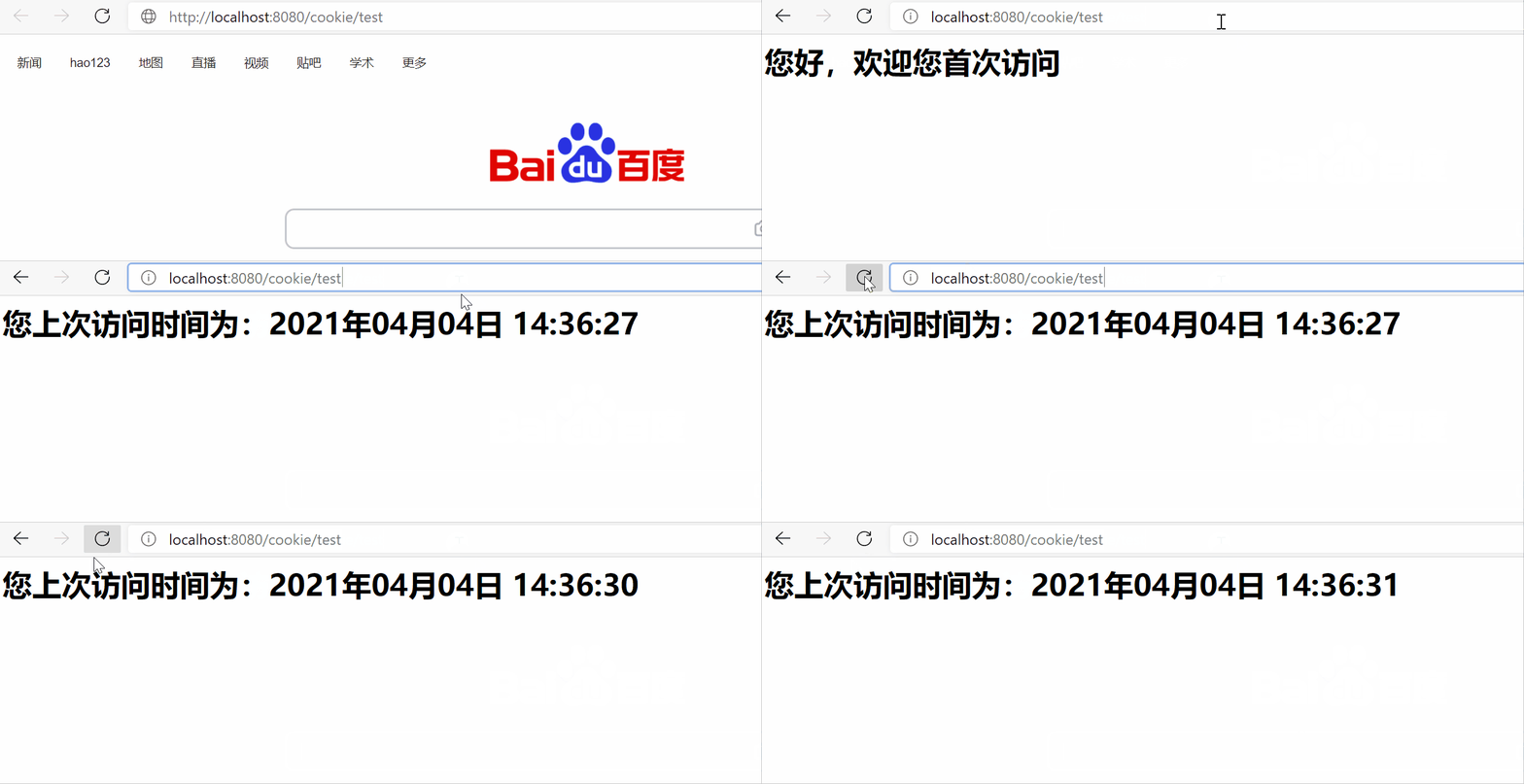
在浏览器中访问:http://localhost:8080/cookie/test
结果如下:
Session
Session:在计算机中,尤其是在网络应用中,称为“会话控制”。Session对象存储特定用户会话所需的属性及配置信息。这样,当用户在应用程序的Web页之间跳转时,存储在Session对象中的变量将不会丢失,而是在整个用户会话中一直存在下去。当用户请求来自应用程序的 Web页时,如果该用户还没有会话,则Web服务器将自动创建一个 Session对象。当会话过期或被放弃后,服务器将终止该会话。Session 对象最常见的一个用法就是存储用户的首选项。例如,如果用户指明不喜欢查看图形,就可以将该信息存储在Session对象中。有关使用Session 对象的详细信息,请参阅“ASP应用程序”部分的“管理会话”。注意会话状态仅在支持cookie的浏览器中保留。
Cookie 和Session是什么?
看完就彻底懂了session和cookie
概念:服务器端会话技术,在一次会话的多次请求间共享数据,将数据保存在服务器端的对象中(Session是一个HttpSession对象)。
Session快速入门
使用步骤:
- 获取Session(HttpSession对象):
HttpSession session = request.getSession();
- 使用HttpSession对象:
- 存储数据:
void setAttribute(String name,Object obj)
- 通过键获取值:
Object getAttitude(String name)
- 通过键移除键值对:
void removeAttribute(String name)
共享数据例子:我们分别创建SessionDemo01和SessionDemo02,代码如下:
1
2
3
4
5
6
7
8
9
10
11
12
13
14
15
16
17
18
19
20
21
22
23
24
| package session;
import javax.servlet.ServletException;
import javax.servlet.annotation.WebServlet;
import javax.servlet.http.HttpServlet;
import javax.servlet.http.HttpServletRequest;
import javax.servlet.http.HttpServletResponse;
import javax.servlet.http.HttpSession;
import java.io.IOException;
@WebServlet("/sessionDemo01")
public class SessionDemo01 extends HttpServlet {
protected void doPost(HttpServletRequest request, HttpServletResponse response) throws ServletException, IOException {
HttpSession session = request.getSession();
session.setAttribute("msg","sessionTest");
}
protected void doGet(HttpServletRequest request, HttpServletResponse response) throws ServletException, IOException {
this.doPost(request, response);
}
}
|
1
2
3
4
5
6
7
8
9
10
11
12
13
14
15
16
17
18
19
20
21
22
23
24
25
| package session;
import javax.servlet.ServletException;
import javax.servlet.annotation.WebServlet;
import javax.servlet.http.HttpServlet;
import javax.servlet.http.HttpServletRequest;
import javax.servlet.http.HttpServletResponse;
import javax.servlet.http.HttpSession;
import java.io.IOException;
@WebServlet("/sessionDemo02")
public class SessionDemo02 extends HttpServlet {
protected void doPost(HttpServletRequest request, HttpServletResponse response) throws ServletException, IOException {
HttpSession session = request.getSession();
Object msg = session.getAttribute("msg");
System.out.println("msg:"+msg);
}
protected void doGet(HttpServletRequest request, HttpServletResponse response) throws ServletException, IOException {
this.doPost(request, response);
}
}
|
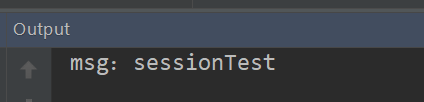
然后在浏览器中依次访问:http://localhost:8080/cookie/sessionDemo01和http://localhost:8080/cookie/sessionDemo02
结果如下:
Session原理分析
session也是一种记录浏览器状态的机制,但与cookie不同的是,session是保存在服务器中。 由于http是无状态协议,当服务器存储了多个用户的session数据时,如何确认http请求对应服务器上哪一条session,相当关键。 这也是session原理的核心内容。
session理解与总结
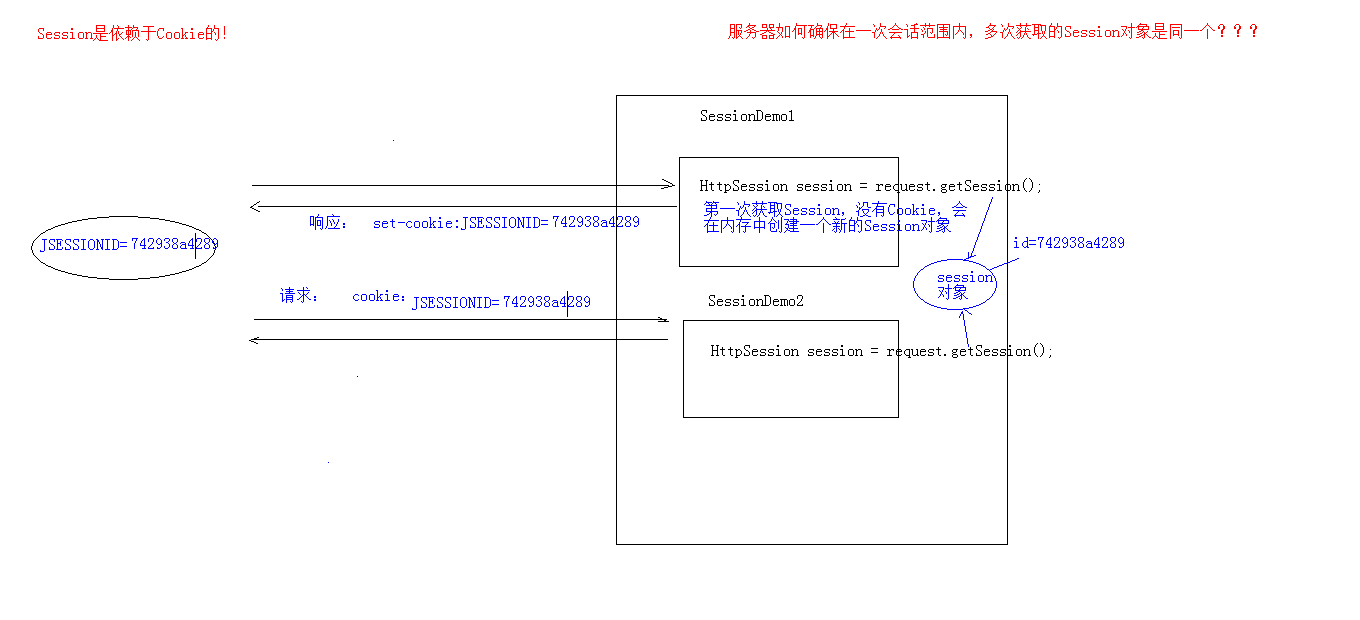
session的实现是依赖cookie的
视频讲解
Session细节讲解
视频讲解
- 当客户端关闭后,服务器不关闭,两次获取session是否为同一个?
- 客户端不关闭,服务器关闭后,两次获取的session是同一个吗?
- session什么时候被销毁?
当客户端关闭后,服务器不关闭,两次获取session是否为同一个?
默认情况下。不是。
如果需要相同,则可以创建Cookie,键为JSESSIONID,设置最大存活时间,让cookie持久化保存,例如:
1
2
3
| Cookie c = new Cookie("JSESSIONID",session.getId());
c.setMaxAge(60*60);
response.addCookie(c);
|
客户端不关闭,服务器关闭后,两次获取的session是同一个吗?
不是同一个,所以为了要确保数据不丢失。tomcat自动完成以下工作:
- session的钝化:在服务器正常关闭之前,将session对象系列化到硬盘上
- session的活化:在服务器启动后,将session文件转化为内存中的session对象即可
session什么时候被销毁?
session被销毁的情况:
-
服务器关闭
-
session对象调用invalidate()
-
session默认失效时间为30分钟
Session特点
session特点:
- session用于存储一次会话的多次请求的数据,存在服务器端
- session可以存储任意类型,任意大小的数据
session与Cookie的区别:
- session存储数据在服务器端,Cookie在客户端
- session没有数据大小限制,Cookie有
- session数据安全,Cookie相对于不安全
Session案例:验证码
案例需求:
- 访问带有验证码的登录页面login.jsp
- 用户输入用户名,密码以及验证码
- 如果用户名和密码输入有误,跳转登录页面,提示:用户名或密码错误
- 如果验证码输入有误,跳转登录页面,提示:验证码错误
- 如果全部输入正确,则跳转到主页success.jsp,显示:用户名,欢迎您
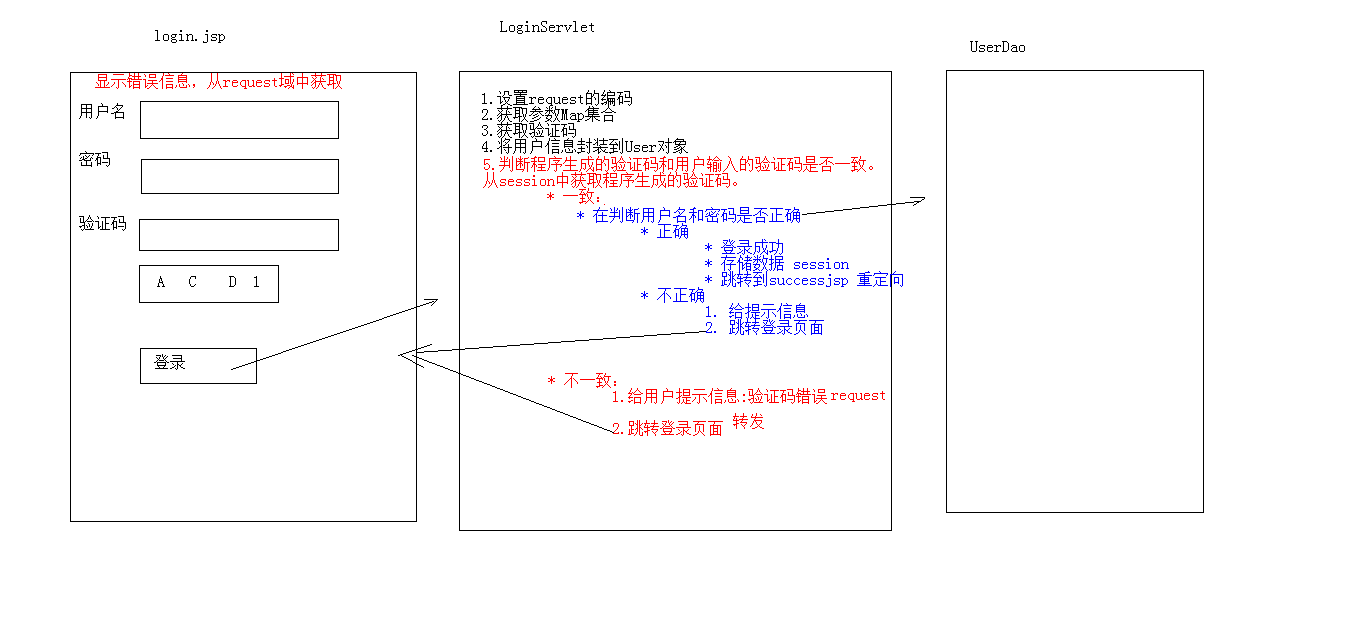
(视频讲解)
代码实现:(之前的登录案例已经实现的登录功能,所以我们这里的用户名和密码就不从数据库中获取了)
先创建login.jsp,代码如下:
1
2
3
4
5
6
7
8
9
10
11
12
13
14
15
16
17
18
19
20
21
22
23
24
25
26
27
28
29
30
31
32
33
34
35
36
37
38
39
40
41
42
43
44
45
46
47
48
49
| <%@ page contentType="text/html;charset=UTF-8" language="java" %>
<html>
<head>
<title>login</title>
<script>
window.onload = function(){
document.getElementById("img").onclick = function(){
this.src="/cookie/check?time="+new Date().getTime();
}
}
</script>
<style>
div{
color: red;
}
</style>
</head>
<body>
<form action="/cookie/login" method="post">
<table>
<tr>
<td>用户名</td>
<td><input type="text" name="username"></td>
</tr>
<tr>
<td>密码</td>
<td><input type="password" name="password"></td>
</tr>
<tr>
<td>验证码</td>
<td><input type="text" name="checkCode"></td>
</tr>
<tr>
<td colspan="2"><img id="img" src="/cookie/check"></td>
</tr>
<tr>
<td colspan="2"><input type="submit" value="登录"></td>
</tr>
</table>
</form>
<%--三元表达式,如果为null,为空字符串,不为null才提示相关错误信息--%>
<div><%=request.getAttribute("checkCode_error") == null ? "" : request.getAttribute("checkCode_error")%></div>
<div><%=request.getAttribute("login_error") == null ? "" : request.getAttribute("login_error") %></div>
</body>
</html>
|
再创建success.jsp,代码如下:
1
2
3
4
5
6
7
8
9
10
11
| <%@ page contentType="text/html;charset=UTF-8" language="java" %>
<html>
<head>
<title>Title</title>
</head>
<body>
<h1><%=request.getSession().getAttribute("username")%>,欢迎您</h1>
</body>
</html>
|
然后创建CheckCodeServlet,来生成验证码
1
2
3
4
5
6
7
8
9
10
11
12
13
14
15
16
17
18
19
20
21
22
23
24
25
26
27
28
29
30
31
32
33
34
35
36
37
38
39
40
41
42
43
44
45
46
47
48
49
50
51
52
53
54
55
56
57
58
59
60
61
62
63
64
65
66
67
68
69
70
| package session;
import javax.imageio.ImageIO;
import javax.servlet.ServletException;
import javax.servlet.annotation.WebServlet;
import javax.servlet.http.HttpServlet;
import javax.servlet.http.HttpServletRequest;
import javax.servlet.http.HttpServletResponse;
import java.awt.*;
import java.awt.image.BufferedImage;
import java.io.IOException;
import java.util.Random;
@WebServlet("/check")
public class CheckCodeServlet extends HttpServlet {
protected void doPost(HttpServletRequest request, HttpServletResponse response) throws ServletException, IOException {
int width = 100;
int height = 50;
BufferedImage image = new BufferedImage(width,height,BufferedImage.TYPE_INT_RGB);
Graphics g = image.getGraphics();
g.setColor(Color.PINK);
g.fillRect(0,0,width,height);
g.setColor(Color.BLUE);
g.drawRect(0,0,width - 1,height - 1);
String str = "ABCDEFGHIJKLMNOPQRSTUVWXYZabcdefghigklmnopqrstuvwxyz0123456789";
Random ran = new Random();
StringBuilder stringBuilder = new StringBuilder();
for (int i = 1; i <= 4; i++) {
int index = ran.nextInt(str.length());
char ch = str.charAt(index);
stringBuilder.append(ch);
g.drawString(ch+"",width/5*i,height/2);
}
String checkCode_session = stringBuilder.toString();
request.getSession().setAttribute("checkCode_session",checkCode_session);
g.setColor(Color.GREEN);
for (int i = 0; i < 10; i++) {
int x1 = ran.nextInt(width);
int x2 = ran.nextInt(width);
int y1 = ran.nextInt(height);
int y2 = ran.nextInt(height);
g.drawLine(x1,y1,x2,y2);
}
ImageIO.write(image,"jpg",response.getOutputStream());
}
protected void doGet(HttpServletRequest request, HttpServletResponse response) throws ServletException, IOException {
this.doPost(request,response);
}
}
|
最后创建LoginServlet代码如下:
1
2
3
4
5
6
7
8
9
10
11
12
13
14
15
16
17
18
19
20
21
22
23
24
25
26
27
28
29
30
31
32
33
34
35
36
37
38
39
40
41
42
43
44
45
46
47
48
49
50
51
52
53
| package session;
import javax.servlet.ServletException;
import javax.servlet.annotation.WebServlet;
import javax.servlet.http.HttpServlet;
import javax.servlet.http.HttpServletRequest;
import javax.servlet.http.HttpServletResponse;
import java.io.IOException;
import java.util.Map;
@WebServlet("/login")
public class LoginServlet extends HttpServlet {
protected void doPost(HttpServletRequest request, HttpServletResponse response) throws ServletException, IOException {
request.setCharacterEncoding("utf-8");
String username = request.getParameter("username");
String password = request.getParameter("password");
String checkCode = request.getParameter("checkCode");
String checkCode_session = (String) request.getSession().getAttribute("checkCode_session");
request.getSession().removeAttribute("checkCode_session");
if (checkCode_session!=null && checkCode_session.equalsIgnoreCase(checkCode)) {
if (username.equals("root")&&password.equals("1234")){
request.getSession().setAttribute("username",username);
response.sendRedirect("/cookie/success.jsp");
}else {
request.setAttribute("login_error","用户名或密码错误");
request.getRequestDispatcher("/login.jsp").forward(request,response);
}
}else {
request.setAttribute("checkCode_error","验证码错误");
request.getRequestDispatcher("/login.jsp").forward(request,response);
}
}
protected void doGet(HttpServletRequest request, HttpServletResponse response) throws ServletException, IOException {
this.doPost(request, response);
}
}
|
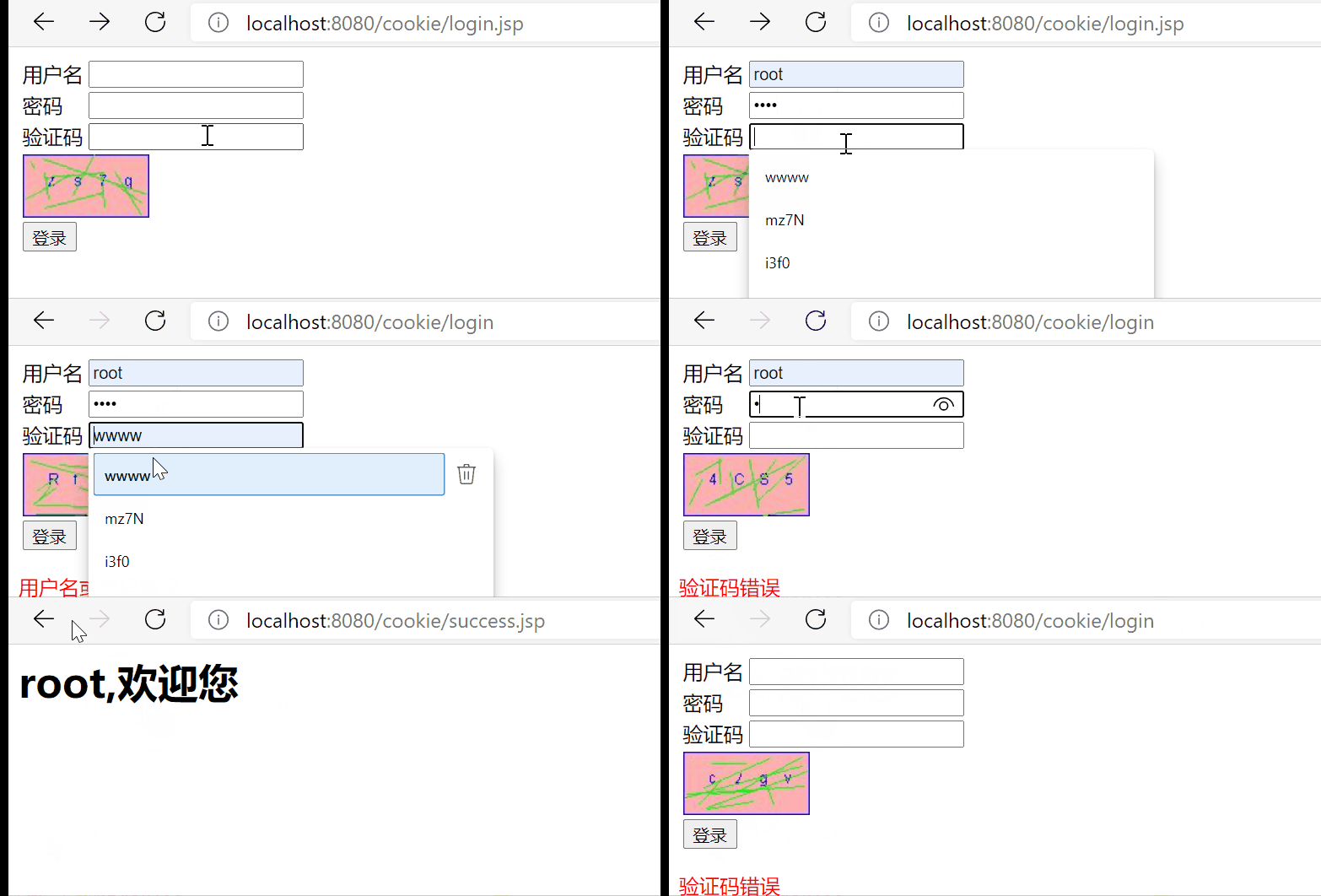
在浏览器中访问:http://localhost:8080/cookie/login.jsp
结果如下:
JSP
**JSP全称Java Server Pages,是一种动态网页开发技术。**它使用JSP标签在HTML网页中插入Java代码。标签通常以<%开头以%>结束。
JSP是一种Java servlet,主要用于实现Java web应用程序的用户界面部分。网页开发者们通过结合HTML代码、XHTML代码、XML元素以及嵌入JSP操作和命令来编写JSP。
JSP通过网页表单获取用户输入数据、访问数据库及其他数据源,然后动态地创建网页。
JSP标签有多种功能,比如访问数据库、记录用户选择信息、访问JavaBeans组件等,还可以在不同的网页中传递控制信息和共享信息。
(jsp就是在html里面写java代码,servlet就是在java里面写html代码…其实jsp经过容器解释之后就是servlet。)
JSP菜鸟教程
概念:Java Server Pages: java服务器端页面
可以理解为:一个特殊的页面,其中既可以指定定义html标签,又可以定义java代码
用于简化书写
JSP原理:JSP本质上就是一个Servlet
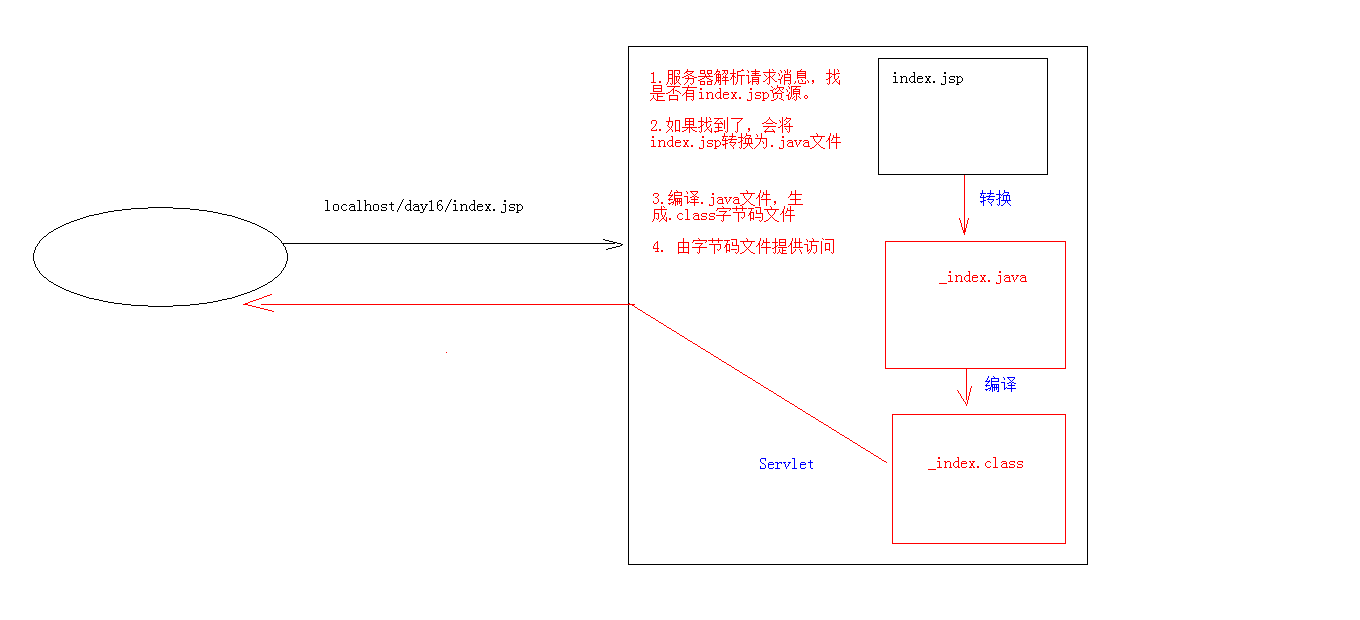
视频讲解
JSP脚本
JSP的脚本:JSP定义Java代码的方式
<% 代码 %>:定义的java代码,在service方法中。service方法中可以定义什么,该脚本中就可以定义什么。<%! 代码 %>:定义的java代码,在jsp转换后的java类的成员位置(定义成员变量或成员方法)<%= 代码 %>:定义的java代码,会输出到页面上。输出语句中可以定义什么,该脚本中就可以定义什么。
JSP内置对象
JSP内置对象:在jsp页面中不需要获取和创建,可以直接使用的对象
JSP 9 大内置对象详解
视频讲解
jsp一共有9个内置对象。这里我们先学习3个:
- request
- response
- out:字符输出流对象。可以将数据输出到页面上。和response.getWriter()类似
response.getWriter().write()和out.write()的区别:
- 在tomcat服务器真正给客户端做出响应之前,会先找response缓冲区数据,再找out缓冲区数据。
- response.getWriter().write()数据输出永远在out.write()之前
JSP案例:改造Cookie-上次访问时间案例
视频讲解
例子:在web包下创建showtime.jsp代码如下:
1
2
3
4
5
6
7
8
9
10
11
12
13
14
15
16
17
18
19
20
21
22
23
24
25
26
27
28
29
30
31
32
33
34
35
36
37
38
39
40
41
42
43
44
45
46
47
48
49
50
51
52
53
54
55
56
57
58
59
60
61
62
63
64
65
66
67
68
69
70
71
72
| <%@ page import="java.util.Date" %>
<%@ page import="java.text.SimpleDateFormat" %>
<%@ page import="java.net.URLEncoder" %>
<%@ page import="java.net.URLDecoder" %>
<%@ page contentType="text/html;charset=UTF-8" language="java" %>
<html>
<head>
<title>ShowTime</title>
</head>
<body>
<%
Cookie[] cookies = request.getCookies();
boolean flag = false;
if (cookies!=null && cookies.length>0){
for (Cookie cookie : cookies) {
String name = cookie.getName();
if ("lastTime".equals(name)){
flag = true;
Date date = new Date();
SimpleDateFormat simpleDateFormat = new SimpleDateFormat("yyyy年MM月dd日 HH:mm:ss");
String simpleDateFormat_date = simpleDateFormat.format(date);
simpleDateFormat_date = URLEncoder.encode(simpleDateFormat_date,"utf-8");
cookie.setValue(simpleDateFormat_date);
cookie.setMaxAge(60*60*24*2);
response.addCookie(cookie);
String value = cookie.getValue();
value = URLDecoder.decode(value,"utf-8");
%>
<h1>您上次访问时间为:<%= value%></h1>
<%
break;
}
}
}else {
Date date = new Date();
SimpleDateFormat sdf = new SimpleDateFormat("yyyy年MM月dd日 HH:mm:ss");
String str_date = sdf.format(date);
System.out.println("编码前:"+str_date);
str_date = URLEncoder.encode(str_date,"utf-8");
System.out.println("编码后:"+str_date);
Cookie cookie = new Cookie("lastTime",str_date);
cookie.setMaxAge(60 * 60 * 24 * 30);
response.addCookie(cookie);
%>
<h1>您好,欢迎您首次访问</h1>
<%
}
%>
</body>
</html>
|
在浏览器中访问:http://localhost:8080/cookie/showtime.jsp
结果和上述Cookie案例是一样的
JSP指令
JSP指令菜鸟教程
视频讲解
jsp指令作用:用于配置JSP页面,导入资源文件
格式:<%@ 指令名称 属性名1=属性值1 属性名2=属性值2 ... %>
分类:
- page:配置JSP页面的
- include: 页面包含的。导入页面的资源文件
- taglib:导入资源
page指令
page:配置JSP页面的
- contentType:等同于
response.setContentType()
- 设置响应体的mime类型以及字符集
- 设置当前jsp页面的编码(只能是高级的IDE才能生效,如果使用低级工具,则需要设置pageEncoding属性设置当前页面的字符集)
- import:导包
- errorPage:当前页面发生异常后,会自动跳转到指定的错误页面
- isErrorPage:标识当前也是是否是错误页面
- true:是,可以使用内置对象exception
- false:否。默认值。不可以使用内置对象exception
include指令
include: 页面包含的。导入页面的资源文件(例子:<%@include file="top.jsp"%>)
taglib指令
taglib:导入资源(例子:<%@ taglib prefix="c" uri="http://java.sun.com/jsp/jstl/core" %>)
JSP注释
jsp注释:
- html注释:
<!-- -->(只能注释html代码片段)
- jsp注释:
<%-- --%>(推荐使用:可以注释所有片段)